Ever wished you could analyze massive datasets without managing servers or complex infrastructure? AWS Athena makes that dream a reality—offering serverless, interactive querying that’s fast, scalable, and surprisingly simple.



What Is AWS Athena and How Does It Work?

AWS Athena is a serverless query service from Amazon Web Services (AWS) that allows you to analyze data directly from files stored in Amazon S3 using standard SQL. Unlike traditional data warehousing solutions, Athena requires no infrastructure setup, cluster management, or upfront costs. It’s designed for simplicity and speed, making it ideal for organizations looking to extract insights from large datasets without the operational overhead.
Core Architecture of AWS Athena
Athena operates on a serverless architecture, meaning AWS manages all the underlying compute resources. When you submit a query, Athena automatically provisions the necessary resources to execute it, scales them based on data volume, and shuts them down when the job is complete. This eliminates the need for provisioning, scaling, or maintaining servers.
- Queries are executed using Presto, an open-source distributed SQL engine optimized for low-latency analytics.
- Data remains in Amazon S3, and Athena reads it in-place using efficient columnar formats like Parquet and ORC.
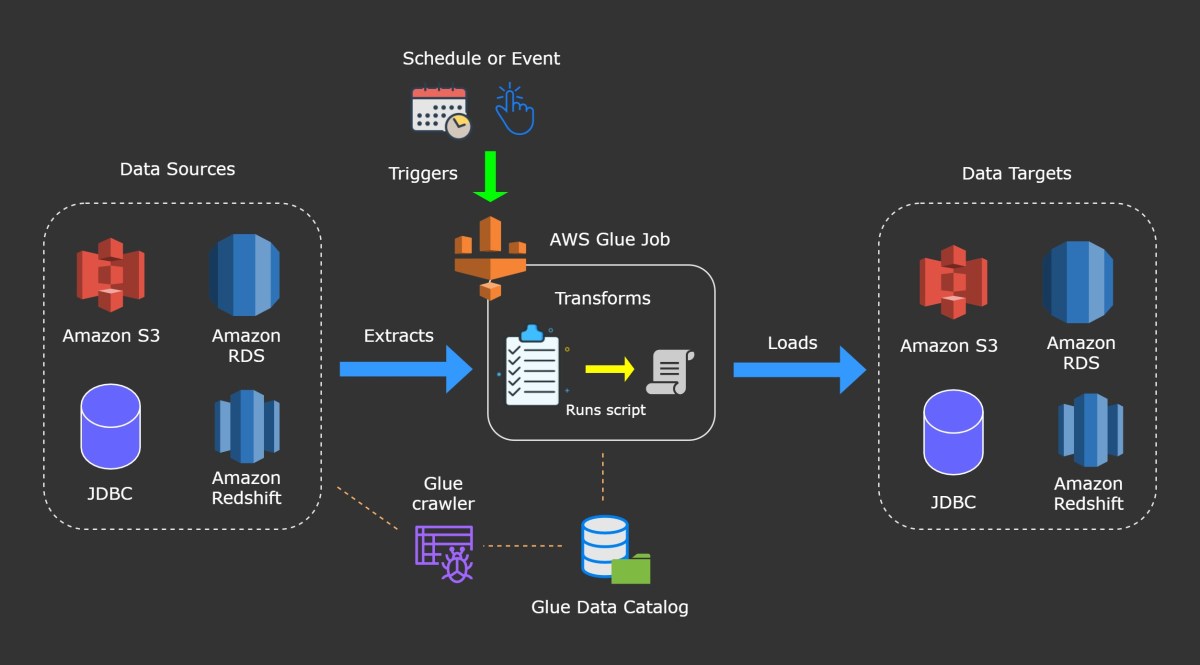
- The service integrates seamlessly with AWS Glue Data Catalog, which stores metadata (table definitions, schema, partitions) for your data.
This architecture enables users to run ad-hoc queries on petabytes of data with sub-minute response times, making it one of the most agile tools in the AWS analytics ecosystem.
How AWS Athena Differs from Traditional Databases
Traditional databases require predefined schemas, persistent storage engines, and ongoing maintenance. In contrast, AWS Athena follows a schema-on-read model—meaning the schema is applied only when a query is executed. This allows flexibility in handling semi-structured and unstructured data formats such as JSON, CSV, and log files.
- No need to load data into a database; Athena reads directly from S3.
- No indexes, materialized views, or performance tuning required.
- Pay-per-query pricing model instead of fixed infrastructure costs.
For example, if you have years of application logs stored in S3, you can instantly query them using Athena without importing them into a data warehouse. This makes it ideal for exploratory analysis, auditing, and troubleshooting.
“AWS Athena removes the friction between data storage and data analysis, enabling teams to get answers faster.” — AWS Official Blog
Key Features That Make AWS Athena a Game-Changer
AWS Athena stands out in the crowded cloud analytics space due to its unique combination of simplicity, scalability, and integration. Let’s explore the features that make it a go-to solution for modern data teams.
Serverless Querying with Zero Infrastructure Management
One of the biggest advantages of AWS Athena is its serverless nature. You don’t need to set up clusters, manage nodes, or worry about capacity planning. The service automatically handles all backend operations, allowing data analysts and engineers to focus solely on writing queries and gaining insights.
- No EC2 instances to configure or maintain.
- No Hadoop or Spark clusters to tune.
- No downtime or patching concerns.
This makes Athena especially valuable for startups and small teams that lack dedicated DevOps resources. It also reduces the risk of misconfigurations and security vulnerabilities associated with managing infrastructure.
Support for Multiple Data Formats and Sources
AWS Athena supports a wide range of data formats, including CSV, JSON, Apache Parquet, Apache ORC, Avro, and even custom formats via SerDe (Serializer/Deserializer). This flexibility allows organizations to query diverse datasets without requiring extensive preprocessing.
- Parquet and ORC are particularly efficient because they are columnar formats that reduce I/O and improve query performance.
- Compression formats like Snappy, GZIP, and Zlib are fully supported.
- You can use federated queries to access data from external sources like RDS, DynamoDB, and on-premises databases via AWS Lambda.
For instance, a marketing team can analyze user behavior by querying JSON logs from a mobile app while joining them with customer data stored in a relational database—all within a single SQL statement using Athena Federated Query.
Seamless Integration with AWS Ecosystem
Athena integrates natively with several AWS services, enhancing its functionality and ease of use:
- AWS Glue: Automatically crawls S3 buckets and populates the Data Catalog with table definitions.
- Amazon QuickSight: Visualize query results directly in dashboards and reports.
- Amazon S3: Primary storage layer where data resides; Athena reads directly from it.
- CloudWatch Logs: Store and analyze VPC flow logs, CloudTrail events, and application logs.
- IAM: Enforce fine-grained access control using policies and roles.
This tight integration means you can build end-to-end data pipelines without leaving the AWS console. For example, you can use S3 for storage, Glue for ETL, Athena for querying, and QuickSight for visualization—all orchestrated within the same environment.
Setting Up Your First AWS Athena Query
Getting started with AWS Athena is straightforward. Whether you’re analyzing logs, financial records, or IoT sensor data, the setup process follows a consistent pattern. Here’s how to run your first query in under 10 minutes.
Step 1: Prepare Your Data in Amazon S3
Before you can query data with AWS Athena, it must be stored in an S3 bucket. Ensure your files are organized in a logical directory structure and formatted for optimal performance.
- Use partitioned paths (e.g.,
s3://my-bucket/logs/year=2024/month=03/day=15/) to reduce the amount of data scanned. - Convert CSV/JSON files to Parquet or ORC for faster queries and lower costs.
- Compress files using Snappy or GZIP to reduce storage and transfer costs.
For example, if you’re analyzing web server logs, store them in a bucket named aws-athena-logs-prod with a partitioned layout based on date. This allows Athena to skip irrelevant partitions during queries.
Step 2: Define a Table Using AWS Glue or Athena Console
To query your data, you need to define a schema. You can do this manually in the Athena console or automatically using AWS Glue Crawlers.
- In the Athena console, go to Settings and ensure your query result location in S3 is configured.
- Navigate to the Query Editor and click Create Table from S3 Console.
- Follow the wizard to specify the S3 path, file format, and delimiter (for CSV).
- Define columns and data types (e.g.,
timestamp STRING, user_id INT, action VARCHAR).
Alternatively, create a Glue Crawler that scans your S3 bucket and infers the schema automatically. Once the crawler runs, it populates the AWS Glue Data Catalog, which Athena uses as its metastore.
Step 3: Run and Optimize Your First Query
With the table defined, you’re ready to run your first SQL query. Open the Athena Query Editor and enter a simple SELECT statement:
SELECT * FROM my_logs_table LIMIT 10;
After execution, Athena will display the results and show the amount of data scanned. To optimize cost and performance:
- Use
SELECT specific_columnsinstead ofSELECT *to minimize data transfer. - Leverage partitioning by filtering on partition keys (e.g.,
WHERE year = '2024' AND month = '03'). - Convert data to columnar formats like Parquet to reduce scan size.
Over time, you can refine your queries and build reusable views for common reporting needs.
Performance Optimization Techniques for AWS Athena
While AWS Athena is inherently fast, query performance and cost depend heavily on how your data is structured and queried. Implementing best practices can significantly reduce query latency and expenses.
Use Columnar File Formats Like Parquet and ORC
One of the most impactful optimizations is converting your data from row-based formats (like CSV) to columnar formats such as Apache Parquet or ORC. These formats store data by columns rather than rows, allowing Athena to read only the columns needed for a query.
- Reduces the amount of data scanned by up to 80% in many cases.
- Supports advanced compression and encoding techniques.
- Enables predicate pushdown, where filters are applied at the storage level.
For example, if you have a 100-column CSV file but only query 5 columns, Athena still scans the entire file. With Parquet, only the relevant columns are read, drastically cutting costs and improving speed.
Partition Large Datasets Strategically
Partitioning divides your data into smaller, manageable chunks based on logical criteria like date, region, or customer ID. When you include partition keys in your WHERE clause, Athena skips entire directories, reducing the volume of data scanned.
- Common partition keys:
year,month,day,region,category. - Avoid over-partitioning (e.g., hourly partitions for small datasets), which can lead to small files and performance degradation.
- Use tools like AWS Glue ETL jobs to repartition and convert data efficiently.
A real-world example: An e-commerce company stores transaction logs in S3 partitioned by year/month/day. A query filtering by WHERE year = '2024' AND month = '03' scans only 1/365th of the annual data, saving both time and money.
Leverage Compression and File Sizing
Compressing your data reduces storage costs and improves query performance by minimizing the amount of data transferred from S3. However, file size also matters—too many small files can degrade performance due to increased overhead.
- Use GZIP or Snappy compression depending on your balance between speed and compression ratio.
- Aim for file sizes between 128 MB and 1 GB for optimal performance.
- Combine small files using AWS Glue or EMR to meet size recommendations.
According to AWS best practices, large, compressed files in columnar formats deliver the best performance for AWS Athena.
Security and Access Control in AWS Athena
Security is a top priority when dealing with sensitive data in the cloud. AWS Athena provides robust mechanisms to control who can access data and how it’s protected during transit and at rest.
Managing Permissions with IAM Policies
AWS Identity and Access Management (IAM) allows you to define granular permissions for users and roles accessing Athena. You can control access to specific databases, tables, or even columns.
- Create IAM policies that grant
athena:StartQueryExecutionandathena:GetQueryResultspermissions. - Restrict access to S3 buckets containing query results using bucket policies.
- Use attribute-based access control (ABAC) for dynamic permissions based on tags.
Example policy snippet:
{
  "Effect": "Allow",
  "Action": [
    "athena:StartQueryExecution",
    "athena:GetQueryResults"
  ],
  "Resource": "arn:aws:athena:us-east-1:123456789012:workgroup/primary"
}
This ensures only authorized users can execute queries and retrieve results.
Data Encryption at Rest and in Transit
AWS Athena supports encryption for both data in S3 and query result outputs. This ensures compliance with regulations like GDPR, HIPAA, and PCI-DSS.
- Enable S3 server-side encryption (SSE-S3, SSE-KMS, or SSE-C) for your data buckets.
- Configure Athena to encrypt query results using AWS KMS keys.
- Data in transit is automatically encrypted using TLS 1.2 or higher.
By default, Athena uses AWS-managed keys (SSE-S3), but for stricter control, you can use customer-managed keys via AWS Key Management Service (KMS).
Audit and Monitor Queries with CloudTrail and CloudWatch
To maintain accountability and detect anomalies, it’s essential to monitor who is running queries and what data they’re accessing.
- Enable AWS CloudTrail to log all Athena API calls, including query executions and table creations.
- Use Amazon CloudWatch to set alarms on query duration, data scanned, or error rates.
- Integrate with AWS Config to track configuration changes to workgroups and settings.
For example, you can create a CloudWatch alarm that triggers when a single query scans more than 100 GB of data—helping prevent accidental cost spikes.
Real-World Use Cases of AWS Athena
AWS Athena isn’t just a theoretical tool—it’s being used by companies across industries to solve real business problems. From log analysis to financial reporting, its versatility shines in practical applications.
Analyzing Application and Server Logs
One of the most common use cases for AWS Athena is log analysis. Organizations store vast amounts of log data in S3 from sources like CloudTrail, VPC Flow Logs, ELB access logs, and custom application logs.
- Query CloudTrail logs to audit API activity and detect unauthorized access.
- Analyze VPC flow logs to identify unusual network traffic patterns.
- Parse application logs to troubleshoot errors or monitor user behavior.
For instance, a DevOps team can run a query like:
SELECT source_ip, COUNT(*) AS request_count
FROM vpc_flow_logs
WHERE action = 'REJECT' AND dst_port = 22
GROUP BY source_ip
ORDER BY request_count DESC;
This helps identify potential brute-force SSH attacks by showing which IPs are attempting unauthorized access.
Financial and Business Reporting
Finance teams use AWS Athena to generate reports from transactional data, billing records, and sales exports. Since Athena supports standard SQL, analysts can use familiar tools like Excel (via ODBC) or BI platforms to build dashboards.
- Join multiple datasets (e.g., sales, inventory, customer data) stored in S3.
- Generate monthly revenue reports with aggregations and filters.
- Automate report generation using scheduled queries or AWS Lambda.
A retail company might run a query to calculate year-over-year growth:
SELECT
  EXTRACT(YEAR FROM order_date) AS year,
  SUM(revenue) AS total_revenue
FROM sales_data
WHERE order_date >= '2022-01-01'
GROUP BY EXTRACT(YEAR FROM order_date)
ORDER BY year;
The results can be exported to CSV or visualized in Amazon QuickSight.
IoT and Sensor Data Analysis
With the rise of IoT devices, organizations collect massive volumes of time-series data from sensors, wearables, and industrial equipment. AWS Athena enables efficient querying of this data without requiring a dedicated time-series database.
- Store sensor readings in Parquet files partitioned by date and device ID.
- Run queries to detect anomalies or calculate averages over time windows.
- Combine sensor data with contextual information (e.g., weather, location) for deeper insights.
For example, a manufacturing plant can analyze temperature readings from machines to predict maintenance needs:
SELECT
  device_id,
  AVG(temperature) AS avg_temp,
  MAX(temperature) AS peak_temp
FROM sensor_data
WHERE date = '2024-03-15' AND temperature > 90
GROUP BY device_id;
This helps identify overheating equipment before failures occur.
Cost Management and Pricing Model of AWS Athena
Understanding AWS Athena’s pricing model is crucial for budgeting and optimizing usage. Unlike traditional data warehouses with fixed costs, Athena uses a pay-per-query model that can be both cost-effective and unpredictable if not managed properly.
How AWS Athena Pricing Works
AWS Athena charges based on the amount of data scanned per query, rounded up to the nearest megabyte, with a minimum of 10 MB per query. As of the latest pricing, the cost is $5.00 per terabyte of data scanned.
- No charges for data stored in S3.
- No charges for failed queries.
- Query result storage in S3 is billed separately under S3 pricing.
For example, if a query scans 1.2 GB of data, you’re charged for 1.2 GB (rounded to the nearest MB). At $5/TB, that’s approximately $0.006 per query. While this seems low, costs can add up quickly with frequent or inefficient queries.
Strategies to Reduce AWS Athena Costs
To keep costs under control, implement the following strategies:
- Convert data to columnar formats (Parquet/ORC) to reduce scan size.
- Use partitioning to limit the scope of queries.
- Avoid
SELECT *and only retrieve necessary columns. - Compress data using GZIP or Snappy.
- Use workgroups to set query execution limits and enforce cost controls.
You can also set up cost allocation tags and monitor spending through AWS Cost Explorer. For teams with high query volumes, consider using Athena Engine Version 2, which offers better performance and lower costs for certain workloads.
Monitoring and Budgeting with AWS Cost Explorer
AWS Cost Explorer provides detailed insights into your Athena spending patterns. You can visualize costs over time, break them down by service, and set up billing alerts.
- Create custom reports showing daily Athena costs.
- Tag queries by department, project, or environment for chargeback purposes.
- Set up SNS notifications when monthly spend exceeds a threshold.
For example, a company might set a budget of $500/month for Athena and receive an alert when 80% of that limit is reached. This proactive monitoring prevents unexpected bills.
What is AWS Athena used for?
AWS Athena is used for running interactive SQL queries on data stored in Amazon S3 without needing to manage servers or load data into a database. Common use cases include log analysis, financial reporting, and querying large datasets in formats like CSV, JSON, Parquet, and ORC.
Is AWS Athena free to use?
AWS Athena is not free, but it follows a pay-per-query pricing model. You pay $5.00 per terabyte of data scanned, with no charges for storage or failed queries. There is a free tier that includes 1 TB of data scanned per month for the first 12 months.
How fast is AWS Athena?
AWS Athena is designed for fast, interactive querying. Most queries return results in seconds to minutes, depending on data size, format, and complexity. Performance improves significantly when using columnar formats like Parquet and proper partitioning.
Can AWS Athena query data from RDS or DynamoDB?
Yes, AWS Athena can query data from relational databases like RDS and NoSQL databases like DynamoDB using Athena Federated Query. This feature allows you to run SQL queries across multiple data sources without moving data.
How do I optimize AWS Athena performance?
To optimize AWS Athena performance, convert data to columnar formats (Parquet/ORC), partition large datasets, compress files, avoid SELECT *, and use appropriate file sizes (128 MB – 1 GB). Also, leverage AWS Glue for schema management and ETL processes.
In summary, AWS Athena revolutionizes how organizations interact with data in the cloud. By eliminating infrastructure management, supporting diverse data formats, and integrating seamlessly with the AWS ecosystem, it empowers teams to gain insights quickly and cost-effectively. Whether you’re analyzing logs, generating business reports, or exploring IoT data, Athena provides a powerful, serverless solution. With proper optimization and cost controls, it can become a cornerstone of your data analytics strategy. As cloud adoption grows, tools like AWS Athena will continue to redefine the boundaries of what’s possible in data analysis.
Recommended for you 👇
Further Reading: